


Docu Reader - PDF Reader
3.857.00 Reviews
App Specs
- Version
- 1.2.2
- Updated On
- License
- Free
- Downloads
- 500,000+
- Developer
- Simplibook
- Categories
- Tools
- Platform
- Android
Screenshots
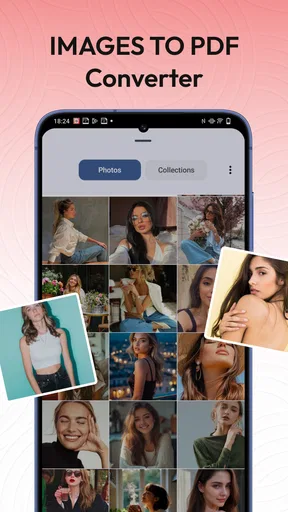
 Analysis by AppCompare
I approached Docu Reader as the kind of practical tool I would keep on my phone for opening documents quickly, checking a downloaded form, or turning a few images into one PDF. It is a free tools app from Simplibook, aimed at everyday document handling rather than heavy office work. After using it, my overall impression is that it makes the most sense for people who want a straightforward place to read PDFs, convert images, and keep basic document tasks together without paying for a larger productivity suite.
The app is currently at version 1.2.2 and supports Android 8.0 or later. That combination matters because it keeps the entry barrier fairly low for anyone using an older Android phone, while the version number also suggests a product that is still being refined rather than a long-established document platform with every advanced feature already in place. Its audience is broad: the content rating is Everyone, it is free to use, and its presence on more than 500 thousand devices shows that it has moved beyond being an obscure utility.
What using Docu Reader feels like today
The first thing I noticed is that the app has a clear practical identity. It is not trying to be a full word processor, cloud office, or professional PDF editor. Its useful center is quick document access: open a PDF, look through it, and handle image-to-PDF conversion when a paper document or group of pictures needs to become a shareable file.
That focus is helpful because document apps often become crowded with tools that most people rarely touch. When I only need to inspect a receipt, read an instruction sheet, or check a form before sending it, I do not necessarily want a large suite that takes time to load or pushes me toward an account-based workflow. Docu Reader fits the lighter end of that task spectrum.
I would describe the current experience as suitable for short, repeated jobs rather than long editing sessions. Reading a PDF on a phone is naturally more comfortable when the file is opened quickly and the interface does not distract from the page. The app’s value is therefore tied less to spectacular features and more to reducing the number of steps between receiving a document and understanding what is inside it.
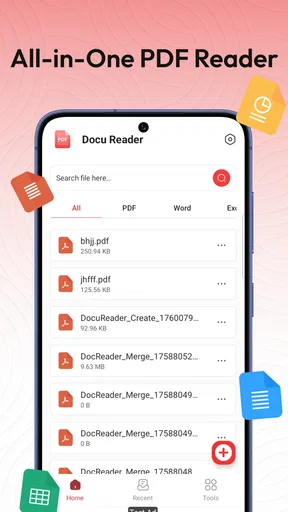
There is also a useful distinction between reading and managing. A basic viewer is enough when I am checking a document once, but a phone gradually collects forms, manuals, tickets, scans, and downloaded attachments. The management side becomes important when I need to find a file again or decide which images belong together in a PDF. That is where this app is more relevant than a viewer that only opens files from another application.
A realistic everyday workflow
Imagine I have photographed several pages of a signed form after an appointment. The images sit in my gallery, but sending them separately is inconvenient and makes the recipient reconstruct the document manually. With Docu Reader, the sensible workflow is to select the relevant images, turn them into one PDF, review the result, and then share or store that document where I need it.
Worth Reading Before You Choose

EA SPORTS FC Mobile 26 Is a Bigger Football Game, but It Takes Time

Flipboard Shows What News Apps Must Do Beyond the Feed

Switching to Android Auto Means Rethinking Your Driving Routine

Google Calendar Makes a Crowded Week Easier to Manage

Ludo King Makes the Most of the Minutes Between Plans

Baby Panda World Brings Quick Play to Modern Phones, but Its Game Library Feels Busy
The small but important advantage is consistency. A PDF gives the pages a single container, which is easier to attach to an email or keep with other records. I would still check the page order and readability before sending anything important. A conversion tool can create a file successfully while leaving a page rotated, cropped poorly, or photographed in dim lighting. The app can organize the material, but it cannot repair a blurry original.
For a student, another practical use is combining photographed notes or whiteboard pages into a single revision file. For a renter, it could help gather inspection photos into one document. For a small seller, it may be convenient for turning product or delivery images into a compact record. These are modest tasks, but they are exactly the situations where opening a larger office application feels excessive.
Reading is the strongest reason to install it
As a PDF reader, the app is easiest to understand. I would use it when a file arrives through messaging, appears in a download folder, or is already stored on the phone. A dedicated reader gives that document a more focused place than the gallery or a browser tab, especially when I expect to return to it later.
That said, I would not confuse reading support with document editing. Someone who needs to rewrite paragraphs, build complex forms, add professional annotations, sign with a specialized certificate, or compare several versions side by side should look toward a more advanced PDF suite. Docu Reader is better positioned as a reader and basic document utility than as a replacement for desktop publishing software.
Its free price is a meaningful part of the appeal. For occasional reading and simple conversion, paying for a large subscription can feel disproportionate. The trade-off is that free tools may not offer the depth, integrations, or polished workflow of premium alternatives. I would choose this app when my priority is access and convenience, not a complete professional document pipeline.
Turning images into PDFs without overcomplicating the job
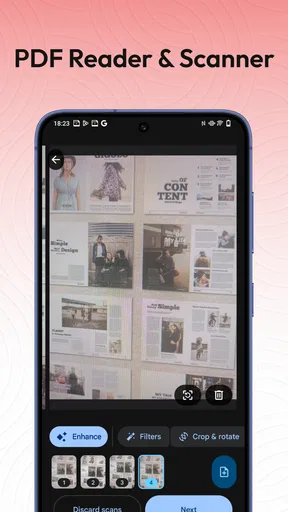
The image conversion feature is the most useful addition beyond ordinary reading. It addresses a common phone problem: cameras create individual image files, while many real-world tasks expect one PDF. Receipts, identity-related paperwork, handwritten notes, and multi-page forms all benefit from being grouped into one document.
My advice is to prepare the source images before converting them. Crop away unnecessary background, retake pages with shadows, and keep the camera parallel to the paper. This is not just about appearance. Clean source images produce a document that is easier to read on a small screen and less frustrating for the person receiving it.
I would also create the pages in a deliberate order instead of assuming the gallery selection will match the order I have in mind. For a two-page document, an error is easy to fix. For a longer scan, a misplaced page can make the final file confusing even though the conversion itself worked. This is one of the less obvious trade-offs of a simple image-to-PDF workflow: fewer controls can mean faster completion, but they also make careful preparation more important.
Another useful habit is to open the finished PDF before sharing it. I look for blank pages, sideways images, cut-off edges, and text that is too small to read. This quick check prevents the most common mistake with mobile scanning workflows: assuming that a successful export automatically means a usable document.
How the current release changes the conversation
The app was released on October 14, 2025, and the current version is 1.2.2. I see those details as context for judging its maturity. This is not a product I would evaluate as if it had already spent years accumulating every feature requested by professional users. It is more sensible to judge whether the current foundation handles its central jobs cleanly.
Because the release is relatively recent, I would pay attention to how Simplibook continues to shape the experience. A document utility can improve significantly through small refinements: clearer file organization, more reliable opening from other apps, better handling of long PDFs, and smoother conversion steps. I would welcome that kind of focused evolution more than a sudden flood of unrelated tools.
The current version also gives existing users a practical reason to keep checking for updates. In a utility app, improvements are often felt in moments that seem minor until they save time every day. A more predictable import flow or a clearer way to identify the newly created PDF can matter more than a flashy feature that only a small group uses.
What existing users should expect
If I were already using Docu Reader, I would treat it as a dependable companion for basic document chores rather than rebuild my entire workflow around it. The app is most valuable when it stays close to the phone’s files and handles a quick conversion or reading task without demanding a complicated setup.
Existing users should keep their original images until they have checked the exported PDF. That gives them a backup if a page needs to be replaced or the conversion needs to be repeated. I would also avoid using a compressed screenshot as the source when the original document image is available; screenshots and forwarded images can lose clarity, particularly around small print.
For documents containing personal information, I would be cautious about casual sharing and storage regardless of which reader I use. A PDF reader does not remove the need to think about where a file is sent, which apps can access it, or whether a sensitive document should remain on the phone. Docu Reader can be part of a careful workflow, but the user still has to make the privacy decisions.
The app’s broad age rating makes it approachable for general household use, but that should not be mistaken for a guarantee that every document task is appropriate for every user. A child may be able to open a school handout, while an adult should handle financial, medical, or identity documents with more care. The simple interface is an advantage, but it also means users need to supply their own judgment.
Where it has an advantage over usual alternatives
The usual alternatives fall into three groups: a phone’s browser, a gallery or file manager, and a large office or PDF suite. A browser is convenient for a one-time file, but it is not always the most comfortable place to return to documents. A gallery can show images, yet it does not provide the same document-oriented purpose as a PDF reader. A full office suite offers more capability, but often at the cost of extra menus, larger downloads, or features I do not need.
Docu Reader occupies the middle ground. It is more purposeful than opening a PDF wherever the operating system happens to send it, but less ambitious than a professional editor. That makes it a good fit for someone who wants one small utility for viewing and image conversion, especially if advanced editing is rare.
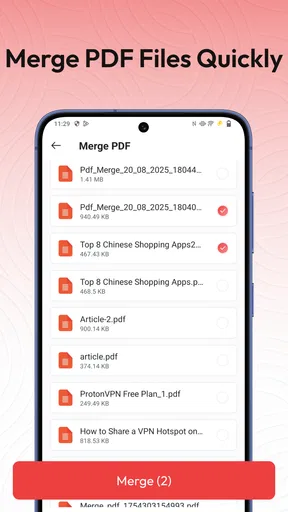
The trade-off is equally clear. If I need reliable collaboration, document markup, optical character recognition, signatures, password workflows, or deep cloud integration, I would choose a specialized alternative instead. Those tools are better when the document itself is part of a formal process. Docu Reader is better when the job is simply to read, combine, and manage basic files on a mobile device.
Remaining friction and who should skip it
The biggest limitation is not a single flaw but the boundary of the product’s purpose. Reading and converting are useful, yet many people use “PDF app” to mean editing, signing, highlighting, filling fields, scanning with automatic cleanup, and sharing through a broader work system. Anyone expecting all of that should set expectations lower or select a more comprehensive application.
I would also skip it if most of my documents are handled on a computer. Desktop readers and office programs generally provide a larger workspace, easier page rearrangement, and more precise control. A phone utility cannot make a long contract as comfortable to inspect as a full-size monitor, particularly when the task involves comparing clauses or checking fine print.
It may not be the right choice for users who already have a trusted document system with automatic synchronization and established folders. Adding another reader can create duplicate copies and make it harder to remember where the latest version lives. In that situation, the convenience of a separate lightweight app may not outweigh the value of keeping everything in one existing workflow.
There is also a human limitation worth mentioning: image-to-PDF conversion is only as good as the pictures selected. If I photograph pages at different angles, mix portrait and landscape orientations, or include unrelated images, the resulting file can feel untidy. The app helps create the container, but it does not replace the attention needed to prepare a clean document.
Useful habits for getting better results
I would group images by one task before starting a conversion. Mixing receipts, notes, and unrelated photos in a single selection makes later management harder.
I would review the final PDF immediately, paying special attention to the first and last pages. Those are easy places to notice an accidental extra image or a missing page.
I would use descriptive filenames after creating documents, especially when several scans are made on the same day. A meaningful name saves more time later than repeatedly opening files to identify them.
I would keep the original photographs until the PDF has been delivered and accepted. This is useful if a recipient reports that one page is unreadable or needs a clearer replacement.
These habits reveal the app’s real role. It is not a magic scanner that removes every step; it is a convenient bridge between the images already on a phone and the document format people commonly request. Used with a little preparation, that bridge is practical and quick.
What I would watch as the product evolves
With Simplibook developing a relatively young utility, I would watch for improvements that strengthen the basics. Better organization would be valuable for people who create many PDFs, while clearer handling of page order would make image conversion safer for longer documents. I would also look for signs that the reading experience remains fast as files become larger and more varied.
I would not judge future progress only by the number of added tools. For this app, reliability is the more important measure. Opening the right file, preserving readable pages, and making the finished PDF easy to locate are the details that determine whether I return to it. A focused update can be more meaningful than a crowded feature list.
The current public response is mixed but reasonably established: Docu Reader holds a 3.7 average from around 606 ratings and has received about 57 written reviews. I read that as a reason to approach it with realistic expectations. There is enough adoption to show that the basic idea appeals to users, while the rating suggests that individual experiences may vary and that it is not universally satisfying for every document need.
That balance matches my own recommendation. I would suggest trying it if I wanted a free Android tool for opening PDFs and converting groups of images into documents, especially on a phone running Android 8.0 or newer. I would not present it as a complete replacement for a professional PDF editor or an organized office platform.
In the end, Docu Reader succeeds when the task is small, immediate, and mobile: read a file, gather images, make a PDF, and keep everyday documents manageable. Its strengths are its accessible price, focused purpose, and low barrier for ordinary users. Its limits appear when the workflow demands advanced editing, formal document controls, or desktop-level precision.
For me, the deciding question is simple: do I need a lightweight document tool, or a full document workstation? If the answer is the first, this app is worth considering. If the answer is the second, I would look elsewhere rather than expect a basic reader to grow into something it was not designed to be.
Pros
- Opens PDFs quickly
- even on older Android and iOS devices.
- Supports comfortable reading with zoom
- scrolling
- and page navigation.
- Useful search tool helps locate words or phrases in lengthy documents.
- Clean interface makes basic PDF reading easy for first-time users.
- Works well for viewing documents without needing a complicated setup.
Cons
- Advanced editing and annotation tools may be limited or unavailable.
- Large PDFs can take longer to load on devices with less storage.
- Some features may require an internet connection or premium access.
- The app may display advertisements during regular document use.
- PDF files with unusual fonts or layouts may not render perfectly.
FAQs for Docu Reader - PDF Reader
What is Docu Reader - PDF Reader used for?
Docu Reader - PDF Reader is designed for opening and reading PDF documents on a mobile device. After installing it, users can browse files stored on their phone, access recently opened documents, and read pages without needing a desktop computer. It can be useful for viewing ebooks, manuals, receipts, forms, study materials, and work documents while traveling or away from the office.
Can Docu Reader - PDF Reader open files from different locations?
The app generally works with PDF files saved on the device and may also let you open documents through the Android or iOS file picker, depending on the platform and installed version. This means PDFs received by email, messaging apps, cloud storage, or a web browser can often be opened using the share or “Open with” option. File-access permissions may be required.
Does Docu Reader - PDF Reader support annotations, highlighting, or editing?
Docu Reader - PDF Reader is primarily intended for reading and viewing PDF documents, so users should not assume that it provides the same tools as a full PDF editor. Features such as highlighting, drawing, adding signatures, filling forms, rearranging pages, or changing text can vary by version. Check the app listing and in-app tools before relying on it for advanced document work.
Is Docu Reader - PDF Reader free to download and use?
The application may be available as a free download, but the exact business model can depend on the platform and current release. Some versions of document readers include advertising, optional purchases, or premium features. Before downloading, review the store page for subscription details, in-app purchase information, and any limitations affecting features such as file management, sharing, or an ad-free reading experience.
Is Docu Reader - PDF Reader safe for private or confidential documents?
Users should review the app’s permissions, privacy policy, and developer information before opening sensitive PDFs such as contracts, identity documents, financial records, or medical files. A PDF reader may need storage or file access to work correctly, but unnecessary permissions deserve caution. For confidential material, avoid unknown cloud-upload features and keep the application updated from the official app store.


